Video has become an important part of communication on the internet.
Businesses use it to introduce products, teachers explain difficult subjects through visual lessons, and content creators share tutorials, travel experiences and everyday moments.
However, recording a good video is only one part of the process. The final result often needs trimming, background music, captions and a suitable format before it is ready to share. This is where the Clideo video editor can be useful, offering a browser-based workspace for people who want to improve their footage without installing complicated editing software.
Why video editing matters more than ever
People often decide within seconds whether they want to continue watching a video. Poor audio, unnecessary pauses, unreadable text, or an awkward opening can make useful content less engaging. Simple editing helps remove these distractions and makes the main message easier to understand.
For example, a small business owner recording a product demonstration might need to remove mistakes, add the product name on screen and include background music. A teacher preparing an online lesson may want to combine several recordings and display important points as text.
These tasks do not always require advanced production skills. A clear plan and a few practical editing tools can make an ordinary recording more effective.
What makes browser-based video editing useful?
Traditional desktop editing programs can offer extensive control, but they may require installation, additional storage and time to learn. Browser-based platforms provide another option for users who need to complete everyday editing tasks without setting up a full production environment.
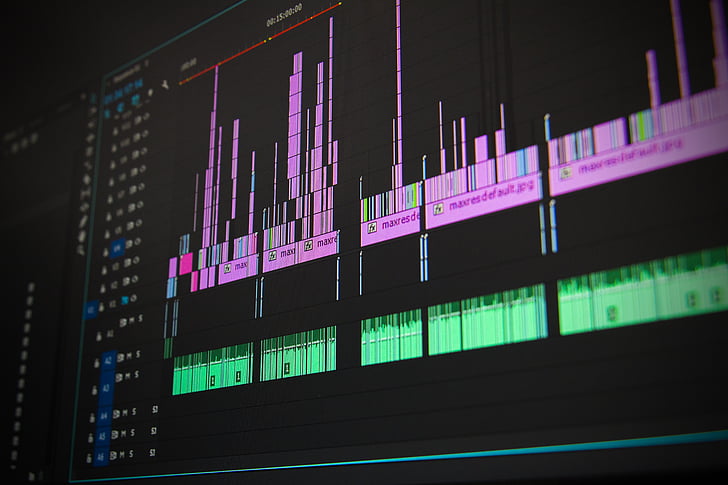
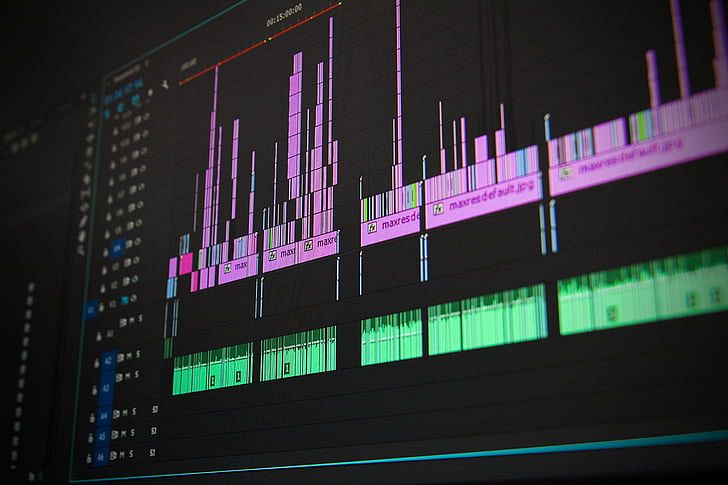
Clideo allows users to work with video, images, audio and text in an online editor. Its timeline helps arrange different media elements and organise them into a single project.
Some practical advantages include:
- No complicated installation: Editing can begin in a compatible web browser.
- Multiple media types: Video clips, pictures, audio tracks and text can be combined in one project.
- Flexible layouts: Videos can be prepared in vertical, square, or landscape formats.
- Useful editing controls: Users can trim footage, adjust playback speed, change visual settings and manage sound.
- Beginner-friendly workflow: The interface is designed to make common editing tasks accessible to people without professional experience.
These features are especially helpful for people who create content regularly, but do not need the complexity of a professional editing studio.
Practical ways to use an online video editor
The value of an editing tool depends largely on the task being completed. Different types of content require different adjustments and understanding these needs makes the editing process more efficient.
1. Creating social media videos
Social media platforms use different video layouts and presentation styles. A vertical video may work well for short-form mobile content, while a landscape format is often more suitable for traditional YouTube videos or presentations.
Before exporting a video, creators should check the dimensions, remove unnecessary sections and make sure that important text remains visible on smaller screens.
2. Preparing product demonstrations
Online sellers can use short videos to show how a product works, explain its benefits, or demonstrate its features. A well-organised demonstration usually follows a simple structure:
- Introduce the product and its main purpose.
- Show the product in use.
- Highlight important features with brief text.
- Remove repetitive footage.
- Finish with a clear closing message.
This approach helps viewers understand the product without having to watch a lengthy recording.
3. Editing educational content
Teachers, trainers and students can combine recorded explanations with supporting visuals. Captions can also make spoken information easier to follow, particularly when viewers watch without sound.
For better results, keep text readable, use consistent formatting and avoid adding decorative effects that distract from the lesson.
4. Turning photos into video stories
Not every video project begins with recorded footage. A collection of photographs can become a slideshow for a birthday, school project, business presentation, or travel recap.
Arrange the images in a logical sequence, choose an appropriate duration for each one and add music where it supports the mood. A simple structure often works better than applying a different effect to every image.
Essential editing features to look for
When choosing an online editor, it helps to focus on the features that solve actual production problems rather than simply counting available effects.
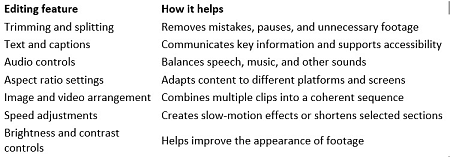
Clideo provides several of these controls within its browser-based editing environment. Users can arrange media on a multi-track timeline, customise text and adjust video settings before exporting the finished project.
A simple workflow for better results
A consistent editing routine can save time and reduce mistakes. Instead of adding effects immediately, begin by deciding what the finished video should communicate.
Step 1: Organise the material
Collect the video clips, photographs and audio files needed for the project. Remove duplicate files and identify the strongest footage before starting.
Step 2: Build the main sequence
Place the clips in the correct order on the timeline. Make sure the beginning introduces the subject clearly and that each following section contributes something useful.
Step 3: Remove unnecessary content
Trim long pauses, repeated explanations and irrelevant scenes. Avoid cutting so aggressively that the video becomes difficult to follow.
Step 4: Improve the presentation
Add titles, captions, music, or supporting images when they improve understanding. Adjust the volume and check whether spoken words remain clear.
Step 5: Choose the right dimensions
Consider where the video will be published. Vertical, square and landscape formats serve different purposes, so select a layout that suits the intended platform.
Step 6: Review and export
Watch the complete video before exporting it. Check spelling, transitions, sound levels and the final frame. If possible, preview the result on a mobile device as well as a computer.
Following these steps gives the project a clear structure and helps prevent small errors from reaching the final version.
Common editing mistakes and how to avoid them
Even useful footage can become less effective when editing decisions are rushed. Several common problems are easy to prevent.
- Using too many effects: Excessive transitions and animations can distract viewers. Choose effects that support the subject.
- Ignoring audio quality: Background music should not overpower speech. Always check sound levels with headphones when possible.
- Adding too much text: Long paragraphs on screen are difficult to read. Use short phrases and explain additional details through narration.
- Choosing the wrong format: Incorrect dimensions can lead to unwanted cropping or empty space around the video.
- Skipping the final review: A quick preview can reveal spelling errors, abrupt cuts, or missing sections before publication.
- Forgetting export requirements: Check the required resolution, file format and file-size limits of the destination platform.
Good editing is not necessarily about making a video look more complicated. It is about presenting information in a clear, organised and enjoyable way.
Is Clideo a practical option for beginners?
Clideo is worth considering for people who want to complete common video editing tasks through a browser. Its online editor supports combining media, adding text and audio, adjusting clips and preparing different aspect ratios without requiring a conventional desktop installation.
It may be useful for students preparing assignments, small businesses producing promotional clips, educators creating lessons and individuals making personal videos. The platform also offers separate tools for tasks such as video compression, resizing, subtitle generation and format conversion.
However, users should consider their project requirements before choosing any editing service. Large files may take longer to upload and browser-based editing depends on a compatible device and a reliable internet connection. Available features, export limits and watermark policies can also vary by plan.
Final thoughts
Producing a useful video does not always require expensive equipment or an elaborate editing setup. Careful trimming, readable text, balanced audio and suitable dimensions can make a noticeable difference to the finished result.
Online editing tools give creators a practical way to handle these tasks while keeping their workflow relatively simple. By choosing features according to the needs of each project, and reviewing the final video before publication, beginners and experienced creators alike can produce content that communicates its message more effectively.